CMS Forms – send email after form submission
Wednesday, April 08, 2026
|
Properties view Settings tab
You can have 1 or many emails that send upon form submission. You can set the subject line and then in your email inbox set a rule on that subject line to help keep your inbox organized. In the body of the email, you can display the field values that were submitted to keep an email record.
Create an Email
- Edit the form
- Click on the Settings tab
- Click on the “+” icon to add an email
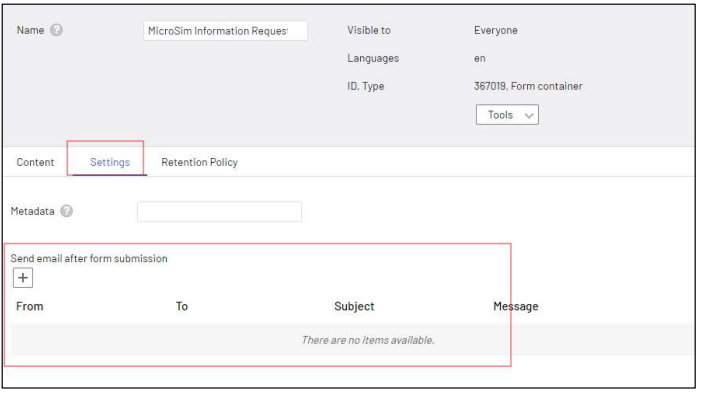
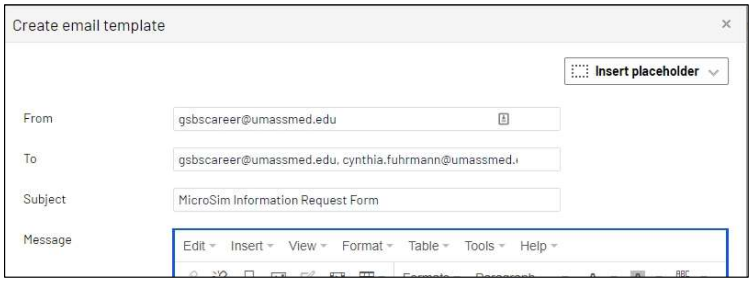
- A window pops up to create your email template
- Add 1 email to the FROM field
- This must be a umassmed.edu email, if any other email is placed here, this email will not send
- If you do not have an email you wish to place here, use no-reply@umassmed.edu
- Add one or many email to the TO field
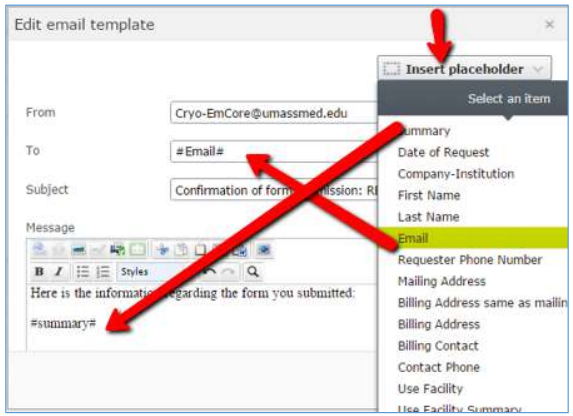
- To display the field values in the body of the email or the subject line, place your cursor where you want the value to display
- Then click on the Insert Placeholder dropdown in the upper right of the template and choose which value you want to
display
- Once the value is set, it will display surrounded with # at the beginning and end of the field name
- Note: #summary# will display all the field names and their values
You can set multiple emails to send. One for your team to know when a form has been submitted, one to the user if they filled in their email address, as well as others if you need to customized the email for different people.
Notes:
- when adding multiple emails to the TO field, separate them by a comma
- you cannot set the FROM field with a placeholder as that is considered spamming since the person filling out the form may not have a umassmed.edu domain. We cannot send emails from other domains, this will cause an error and you will not receive the email. You can set this to any umassmed.edu email, as a default, you can use no-reply@umassmed.edu.
Edit existing emails
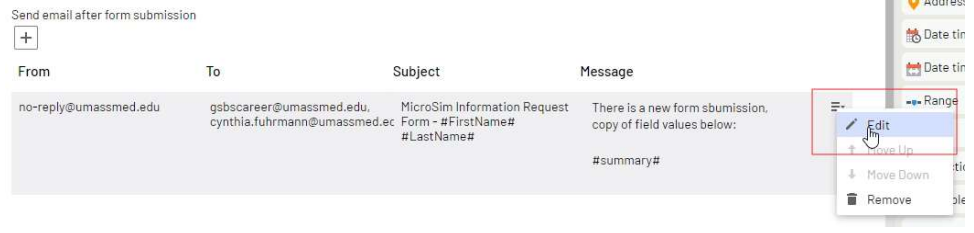
- To edit an existing email, hover over the email properties and a menu icon appears at the right
- Hover over the menu icon and a menu appears, click Edit